|
Sunday
10 August 2003
Instant Messaging: How it Works
There is no doubt that
the Internet has changed the way we communicate. For
many of us, e-mail has virtually replaced
traditional letters and even telephone calls as the
choice for correspondence. Every day, billions of
e-mail messages are sent out. E-mail has been the
most rapidly adopted form of communication ever
known. In less than two decades, it has gone from
obscurity to mainstream dominance.
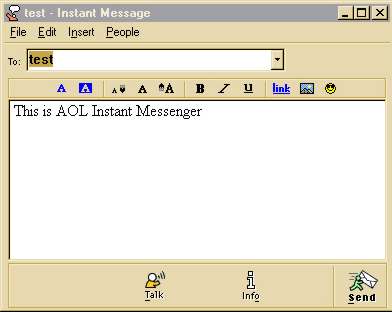
America Online's Instant Messenger (AIM)
program is one of the most popular instant
messaging utilities available.
|
In our fast-paced
world, sometimes even the rapid response of e-mail
is not fast enough. You have no way of knowing if
the person you are sending e-mail to is online at
that particular moment or not. Also, if you are
sending multiple e-mails back and forth with the
same person, you normally have to click through a
few steps to read, reply and send the e-mail. This
is why instant messaging (IM) has gained
popularity.
Instant messaging
allows you to maintain a list of people that you
wish to interact with. You can send messages to any
of the people in your list, often called a buddy
list or contact list, as long as that
person is online. Sending a message opens up a small
window where you and your friend can type in
messages that both of you can see.
Most of the popular
instant-messaging programs provide a variety of
features:
- Instant
messages - Send notes back and forth with a
friend who is online
- Chat -
Create your own custom chat room with friends or
co-workers
- Web links -
Share links to your favorite Web sites
- Images -
Look at an image stored on your friend's
computer
- Sounds -
Play sounds for your friends
- Files -
Share files by sending them directly to your
friends
- Talk - Use
the Internet instead of a phone to actually talk
with friends
- Streaming
content - Real-time or near-real-time stock
quotes and news
In this edition, you
will learn about the history of instant messaging
and how it works. You will also learn what the major
IM programs are, what makes them different from each
other and what the future holds for IM.
Background
Before the Internet became popular, a lot of people
were already online through the use of bulletin
boards and online services. A bulletin
board is comparable to a single, isolated Web site
that you reach using special communications software
and a modem. You create an entry in the software for
the bulletin board that contains the board's direct
phone number and any special parameters for
connecting to the computer hosting the bulletin
board. Once connected to the board, you normally use
a series of menus to navigate through the board's
contents. To reach another board, you have to
disconnect from the first board and dial up to the
other one.
Major online
services, such as America Online (AOL), Prodigy
and CompuServe, were the main way that
ordinary people could connect and communicate with
each other online. Think of an online service as a
very sophisticated bulletin board. Whereas most
small bulletin boards use standard communications
software, online services provide a complete
application that includes the communications
software necessary to connect to their service. This
application also includes the actual interface that
you use once you are online and connected to the
service. This allows the online service to create a
very sophisticated and targeted experience for their
users.
Probably one of the
biggest attractions of the online service model is
the community that it builds. AOL is
considered the pioneer of the online community. AOL
provides its users with the ability to talk in
real-time with each other while they are online
through the use of chat rooms and instant
messages. A chat room is software that allows a
group of people to type in messages that are seen by
everyone in the "room," while instant
messages are basically a chat room for just two
people.
In the early 1990s,
as people began to spend increasing amounts of time
on the Internet, creative software developers
designed software that could reproduce some of the
aspects of an online service. Chat-room software was
developed and set up on Web servers, used by sites
like TalkCity.
Instant messaging
really exploded on the Internet scene in November
1996. That's when Mirablis, a company founded
by four Israeli programmers, introduced ICQ,
a free instant-messaging utility that anyone could
use.
ICQ
ICQ, a
combination of letters that is shorthand for the
phrase "I seek you," is a real-time tool
that uses a software application, called a client,
that resides on your computer. The client
communicates with an ICQ server whenever you are
online and the client is running.
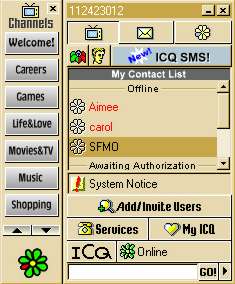
ICQ was one of the first available IM
programs.
|
Look at the steps
below to understand exactly what happens with ICQ.
- You go to the
download page (www.icq.com) for ICQ and get a
copy of the free software client for your
computer.
- You install the
software and open the client.
- The client tries
to connect to the ICQ server. It uses a
proprietary protocol, ICQ v5, for
communication.
- Once the client is
connected to the server, you can enter your name
and password to log in to the server. If this is
your first time on, you can sign up for an
account and immediately begin using it. When the
server verifies your name and password, you are
logged in.
- The client sends
the server the connection information (IP
address and number of the port assigned to the
ICQ client) of the computer you are using. It
also provides the user with the names of
everyone in your ICQ contacts list.
- The server creates
a temporary file that has the connection
information for you and the list of your
contacts. It then checks to see if any of the
users in your contact list are currently logged
in.
- If the server
finds any of your contacts logged in, it sends a
message back to the ICQ client on your computer
with the connection information for that user.
The ICQ server also sends your connection
information to the people in your contact list
that are signed on.
- When your ICQ
client gets the connection information for a
person in your contact list, it changes the
"status" of that person to
"Online."
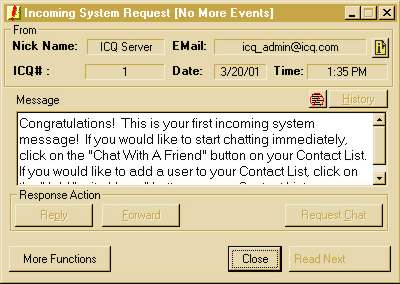
The ICQ message window provides more
details about your session than other IM
utilities do.
|
- You click on the
name of a person in your contact list who is
online, and a window opens that you can enter
text into. You enter a message and click
"Send" to communicate with that
person.
- Because your ICQ
client has the IP address and port number for
the computer of the person that you sent the
message to, your message is sent directly to the
ICQ client on that person's computer. In other
words, the ICQ server is not involved at this
point. All communication is directly between the
two clients.
- The other person
gets your "instant message" and
responds. The ICQ window that each of you see on
your respective computers expands to include a
scrolling dialog of the conversation. Each
person's instant messages appears in this window
on both computers.
- When the
conversation is complete, you close the message
window. Eventually, you go offline and exit ICQ.
When this happens, your ICQ client sends a
message to the ICQ server to terminate the
session. The ICQ server sends a message to the
ICQ client of each person on your contact list
that is currently online to indicate that you
have logged off. Finally, the ICQ server deletes
the temporary file that contained the connection
information for your ICQ client. In the ICQ
clients of your contacts that are online, your
name moves to the "Offline" status
section.
While some of the
details vary between utilities, the basic steps
outlined above for ICQ apply to all of the other IM
utilities on the market today. ICQ is still very
popular. In fact, Mirablis was acquired in June 1998
by AOL, and ICQ became part of the suite of online
services that AOL owns.
AIM
Not long after ICQ established the popularity of IM,
AOL decided to enter the fray. Within a very short
time, AOL Instant Messenger (AIM)
supplanted ICQ as the leading IM utility.
Like all of the other
major IM utilities, AIM uses a proprietary
protocol that is not understood by other
instant-messaging services. A key reason why AIM is
so popular is that it allows AOL members to
communicate with non-members -- other IM utilities
have not been able to provide this link between AOL
and the rest of the Internet. With more than 20
million subscribers to AOL, this is no small matter.
In fact, one of the provisions of the recent
AOL-Time Warner merger was that other services be
allowed access to the AOL community and AIM
protocol.
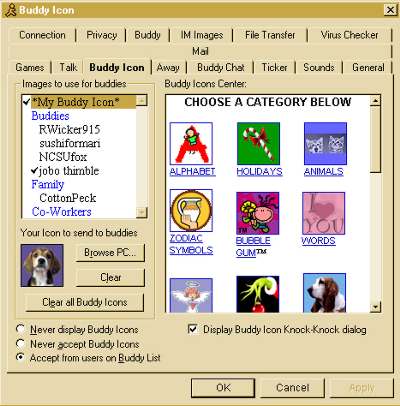
Customizing AIM is easy.
|
It is important to
note that instant messaging is not considered a secure
way to communicate. Messages and connection
information are maintained on servers controlled by
the provider of the IM utility that you use. Most
utilities do provide a certain level of encryption,
but they are not so secure that you should send any
confidential information through the system. There
have been reported cases of IM user logs being
captured and used by nefarious sorts.
More
IM Utilities
Although AIM and ICQ are the leaders in the IM race,
there are several other worthy entrants. Microsoft's
MSN Messenger, like other IM programs, allows
you to talk with another MSN Messenger user just
like you would over the telephone. You and the
person you wish to talk to must each have a sound
card, microphone and speakers to use this feature.

Detail of the MSN menu bar
|
Another IM utility
that has been around for a while is Yahoo!
Messenger. The interesting thing about Yahoo!
Messenger is how well it integrates with other
Yahoo! content and services. There are several
utilities, such as Odigo and Omni, that combine
various services. Odigo allows you to combine AIM,
ICQ and Yahoo! Messenger contact lists. Omni lets
you combine the functionality of AIM, ICQ, MSN
Messenger and Yahoo! Messenger, plus file-sharing
utilities, all in one program!
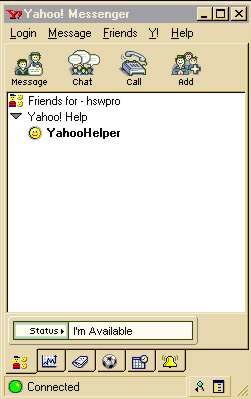
Yahoo!
|
The future of instant
messaging is very bright. All of the utilities
described in this article continue to be updated by
their owners. And the Internet Engineering Task
Force (IETF) is developing a standard protocol
for instant messaging, called the Instant Messaging
and Presence Protocol. Business users are
discovering that instant messaging allows them to
have virtual conferences and collaborate on projects
very easily. In other words, if you have not tried
IM, you're missing out on a whole new world of
communication.
 Email
this page to a Friend
Email
this page to a Friend
|


